Showing posts with label EF6. Show all posts

Thursday, January 8, 2015

Entity Framework DbContext vs ObjectContext vs LINQ2SQL vs ADO.NET vs Business Logic Toolkit Performance

With Entity Framework Microsoft recommends using DbContext instead of ObjectContext. So let's compare their performance.

These tests were performed on i5-4200H, DDR3-1600, Win 8.1 x64, SQL Server 2014, VS 2013, .NET 4.5, EF 6.1.2. Default Northwind database was used.

Tests include two different queries (simple, complex) and two lengths (10, 500 rows). Simple query:

SELECT TOP 10 O.OrderID, O.OrderDate, C.Country, C.CompanyName
FROM Orders O
JOIN Customers C ON O.CustomerID = C.CustomerID

Complex query:

SELECT TOP 10 OD.Quantity, OD.UnitPrice, OD.Discount, O.ShipCountry, S.Country
FROM Orders O
JOIN [Order Details] OD ON O.OrderID = OD.OrderID
JOIN Products P ON OD.ProductID = P.ProductID
JOIN Categories Cat ON P.CategoryID = Cat.CategoryID
JOIN Suppliers S ON P.SupplierID = S.SupplierID
WHERE
    Cat.CategoryID IN (@categoryIds)
    AND S.SupplierID IN (@supplierIds)
ORDER BY OD.Discount DESC

There were 6 methods tested to work with database:

  1. DbContext CodeFirst (generated from DB)
  2. DbContext Designer (generated from DB)
  3. ObjectContext (generated from DB with EdmGen.exe)
  4. LINQ2SQL
  5. ADO.NET
  6. Business Logic Toolkit (raw SQL query)

Each method was tested with 1000 iterations (and 100 iterations to warm up).

Context Initialization

Since context initialization can't be measured directly, it was measured in the following way. Let say we executed a query:

using (var ctx = new MyContext())
{
    var list = ctx.Products.Where(r => r.Name.Length < 10).ToList();
}

then if we executed this query twice:

using (var ctx = new MyContext())
{
    var list = ctx.Products.Where(r => r.Name.Length < 10).ToList();
    var list2 = ctx.Products.Where(r => r.Name.Length < 10).ToList();
}

we got a system of linear equations:

q + ctx = x
2*q + ctx = y

and now it's easy to find context initialization time:

ctx = 2*x - y

Context initialization was measured using "Simple TOP 10" query.
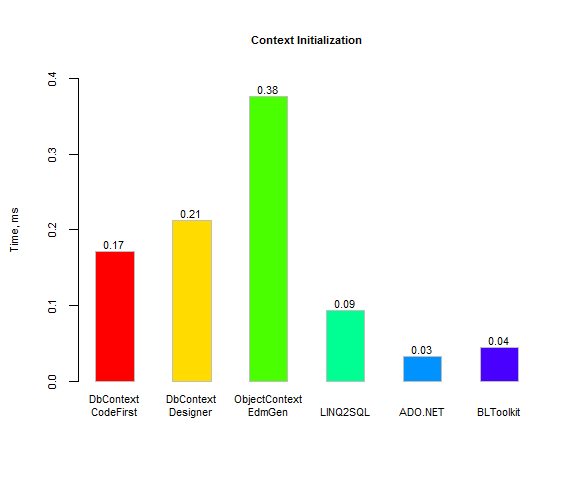
Context initialization time for DbContext CodeFirst and Designer is nearly the same, while ObjectContext requires twice more time. ADO.NET and BLToolkit have nearly the same minimum time, thrice lower than DbContext. LINQ2SQL has twice lower time than DbContext.

But as you can see below context initialization time in absolute time doesn't make a big sense always.

Simple TOP 10 query
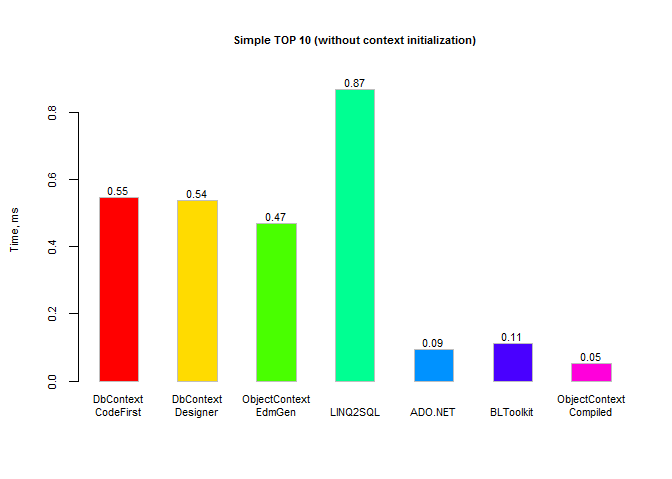
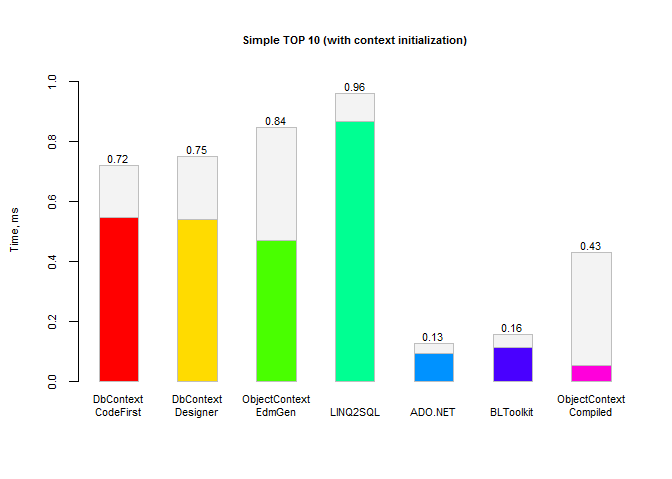
For the simple query with a few rows where request to database takes little time, EF query compilation takes almost all the time for DbContext and ObjectContext. LINQ2SQL takes twice more time than EF, because its mapping is slow (I'll tell why I think so below in "Complex TOP 10" test). BLToolkit takes slightly more time than ADO.NET. And I don't know why Precompiled ObjectContext takes less time than ADO.NET :) (but remember, this time is without context initialization). DbContext doesn't support precompiled queries at all.

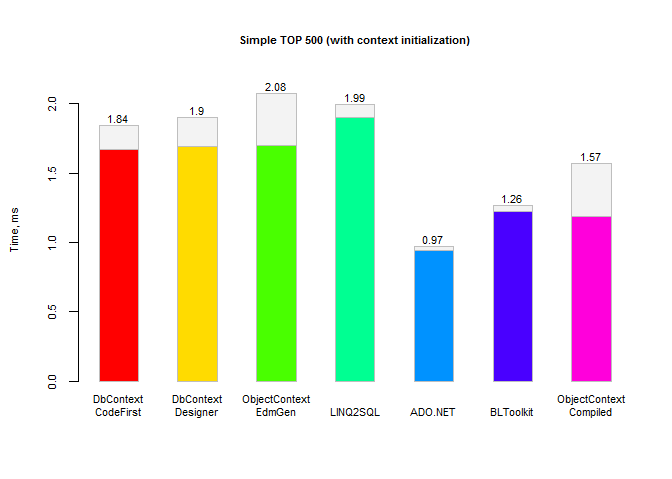
With context initialization:
Simple TOP 500 query
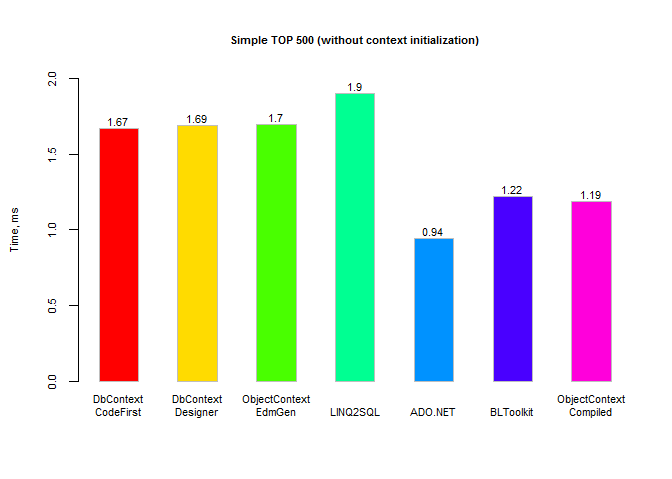
Simple TOP 500 query takes more time to request data from database. This is the reason why DbContext and ObjectContext take only one half time more than ADO.NET, and third time more than BLToolkit and precompiled ObjectContext query.

With context initialization:
Complex TOP 10 query
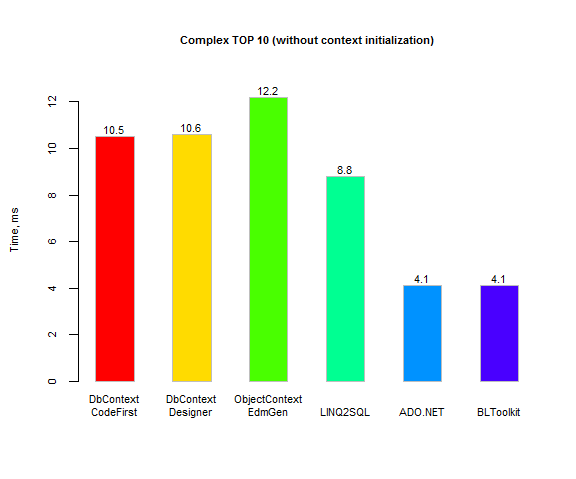
Complex TOP 10 query has similar situation: EF query compilation time is comparable to query request to databse. This is why DbContext and ObjectContext takes only twice more time that ADO.NET and BLToolit.

As you remember, LINQ2SQL in "Simple TOP 10" test took more time than EF. And in this test it takes less time. We can suppose that query execution time() consists in the following steps:

  1. Context initialization - ctx()
  2. Query compilation - comp()
  3. Request to database - db()
  4. Mapping result - map()
Below is a little math :), where "1" is "Simple TOP 10" query, and "2" is this "Complex TOP 10" query.

time(L1) = ctx(L) + comp(L1) + db(1) + map(L1)
time(L2) = ctx(L) + comp(L2) + db(2) + map(L2)
time(EF1) = ctx(EF) + comp(EF1) + db(1) + map(EF1)
time(EF2) = ctx(EF) + comp(EF2) + db(2) + map(EF2)

ctx(L) = 0.09
ctx(EF) = 0.17
time(L1) = 0.87
time(EF1) = 0.55
time(L2) = 8.8
time(EF2) = 10.5

=>

0.87 = 0.09 + comp(L1) + db(1) + map(L1)
8.8 = 0.09 + comp(L2) + db(2) + map(L2)
0.55 = 0.17 + comp(EF1) + db(1) + map(EF1)
10.5 = 0.17 + comp(EF2) + db(2) + map(EF2)

=>

0.78 = comp(L1) + db(1) + map(L1)
7.9 = comp(L2) + db(2) + map(L2)
0.38 = comp(EF1) + db(1) + map(EF1)
10.33 = comp(EF2) + db(2) + map(EF2)

db(1) << (db2)
comp(L1) << comp(L2)
comp(EF1) << comp(EF2)
map(L1) ~= map(L2) = map(L)     // we can suggest this because both queries have 10 rows
map(EF1) ~= map(EF2) = map(EF)  // we can suggest this because both queries have 10 rows

=>

0.78 = comp(L1) + db(1) + map(L)        // (1)
7.9 = comp(L2) + db(2) + map(L)         // (2)
0.38 = comp(EF1) + db(1) + map(EF)      // (3)
10.33 = comp(EF2) + db(2) + map(EF)     // (4)

db(1) << (db2)
comp(L1) << comp(L2)
comp(EF1) << comp(EF2)

=> Let subtract (3) from (1), and (4) from (2)

0.4 = comp(L1) - comp(EF1) + map(L) - map(EF)         // (1)
-2.43 = comp(L2) - comp(EF2) + map(L) - map(EF)       // (2)

comp(L1) << comp(L2)
comp(EF1) << comp(EF2)

=> Let subtract (2) from (1)

2.83 = comp(L1) - comp(EF1) + map(L) - map(EF) - comp(L2) + comp(EF2) - map(L) + map(EF)

comp(L1) << comp(L2)
comp(EF1) << comp(EF2)

=>

2.83 = comp(L1) - comp(EF1) - comp(L2) + comp(EF2)

comp(L1) << comp(L2)
comp(EF1) << comp(EF2)

=>

comp(L2) - comp(L1) + 2.83 =  comp(EF2) - comp(EF1)    // (1)

comp(L1) << comp(L2)                                   // (2)
comp(EF1) << comp(EF2)                                 // (3)

=> Using comparisons (2) and (3)

comp(L2) + 2.83 ~=  comp(EF2)

So, we can say that LINQ2SQL takes lower time for compilation than EF. And if so, then EF takes lower time to map results. As I said above.

With context initialization:

Complex TOP 500 query
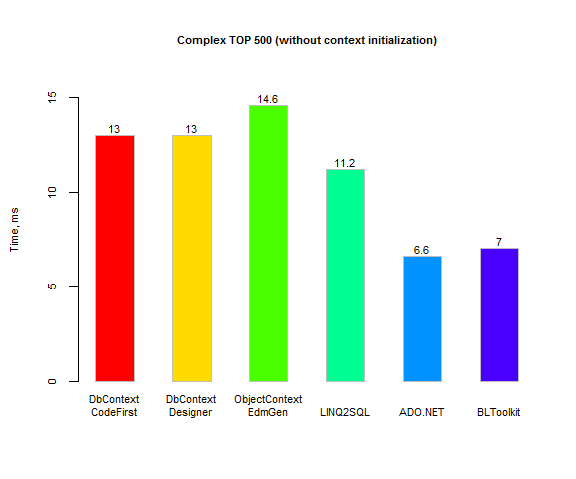
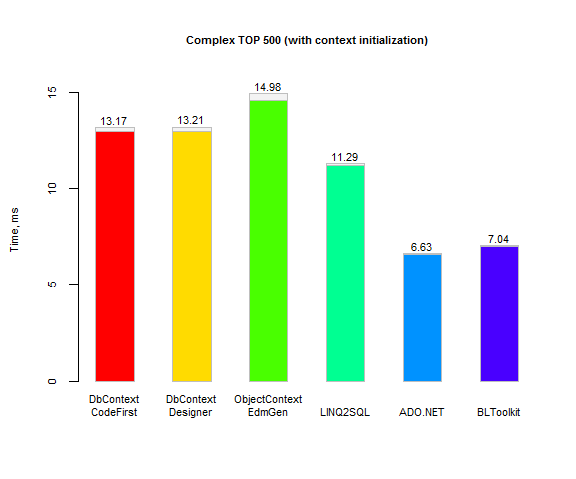
Complex TOP 500 query shows the same results as Complex TOP 10: time to request from database is comparable to compilation time, therefore DbContext and ObjectContext take only twice more time that ADO.NET and BLToolit.

With context initialization:
Conclusions

  • Context initialization for DbContext CodeFirst is slightly faster than for DbContext Designer (both generated from database).
  • Context initialization for ObjectContext is twice slower than for DbContext. But absolute time is not significant - 0.4 ms versus 0.2 ms.
  • LINQ2SQL can be faster than EF for complex queries, and also it can be precompiled for some queries.
  • EF has much faster mapping than LINQ2SQL.
  • ObjectContext is a bit slower than DbContext, but some queries can be precompiled (Parameters cannot be sequences).
  • BLToolkit doesn't provide compilation-time type checking, but it's fast nearly as ADO.NET and it has great mapping capabilities (this article is in Russian (main site is currently down) but you can understand a bit from code samples).

Raw results (XSLT).

View project source code at Bitbucket.

Sunday, December 21, 2014

SQLite Entity Framework Database First Tutorial

This tutorial describes how to use SQLite database-first method with Visual Studio 2013 and Entity Framework 6. This article is based on Tomasz Maciejewski topic SQLite and Entity Framework with Visual Studio Express 2013, which shows how to generate EDMX. That method works but Visual Studio says that EDMX contains errors (though it compiles). This article's method doesn't produce errors.

I will use Visual Studio 2013, SQLite 1.0.94.0, Entity Framework 6.1.1, .NET Framework 4.5, and targeting both 32 and 64 bit platforms.

Let's start from scratch and create database for a simplest blog. There will be only posts and comments.

I used SQLiteStudio to create database. These are the tables saved in "Blog.sqlite" database:

CREATE TABLE Posts
(
    Id INTEGER PRIMARY KEY AUTOINCREMENT NOT NULL,
    Created DATETIME NOT NULL,
    Text NTEXT NOT NULL
);

CREATE TABLE Comments
(
    Id INTEGER PRIMARY KEY AUTOINCREMENT NOT NULL,
    Created DATETIME NOT NULL,
    PostId INTEGER NOT NULL REFERENCES Posts (Id),
    Text NTEXT NOT NULL
);

I'll create a console application for simplicity.

Next step is to create Entity Framework schema files. They are used to represent conceptual and store schemas and mapping between them. You'll need three things:

  1. Database file.
  2. EdmGen utility.
  3. SQLite.

They should be copied into the same directory.

Database is "Blog.sqlite" we've just created.

EdmGen is .NET utility located in "C:\Windows\Microsoft.NET\Framework64\v4.0.30319\EdmGen.exe". Copy it to "the same" directory and create "EdmGen.exe.config" file with the following content:

<configuration>
    <system.data>
        <DbProviderFactories>
            <remove invariant="System.Data.SQLite" />
            <add name="SQLite Data Provider"
                invariant="System.Data.SQLite"
                description=".NET Framework Data Provider for SQLite"
                type="System.Data.SQLite.SQLiteFactory, System.Data.SQLite" />
        </DbProviderFactories>
    </system.data>
</configuration>

Last thing is SQLite. Download precompiled binaries the same as your system (32 or 64 bit), for example Precompiled Binaries for 64-bit Windows (.NET Framework 4.5). If you need both 32 and 64 bit support you can do as the following. Download both 32 and 64 bit versions, extract one of them from ZIP, then delete "SQLite.Interop.dll", then create "x86" and "x64" directories and put 32 bit "SQLite.Interop.dll" version into "x86" directory and 64 bit version in "x64".

Now create "gen.bat" file with the following command:

EdmGen.exe /mode:fullgeneration /c:"Data Source=Blog.sqlite" /provider:System.Data.SQLite /entitycontainer:Blog /project:Blog /language:CSharp

Run "gen.bat" and the following files will be created: "Blog.csdl", "Blog.msl", "Blog.ssdl", "Blog.ObjectLayer.cs", "Blog.Views.cs":

EdmGen for Microsoft (R) .NET Framework version 4.5
Copyright (C) Microsoft Corporation. All rights reserved.

Loading database information...
Writing ssdl file...
Creating conceptual layer from storage layer...
Writing msl file...
Writing csdl file...
Writing object layer file...
Writing views file...

Generation Complete -- 0 errors, 0 warnings

Copy these 5 generated files into project directory into "DAL" folder. Create "Data" folder in the project and copy "Blog.sqlite" inside. Add these files into project. And add reference to "System.Data.Entity" assembly.

For the test, in Visual Studio go to properties of "Blog.sqlite" and set "Copy to Output Directory" parameter value to "Copy always". This option will copy empty database from project into compilation directory and you always will have empty database for every application run from VS.

The go to properties of schema files "Blog.csdl", "Blog.msl", "Blog.ssdl" and set "Build action" to "Embedded Resource" for each file. This puts them into application resources so that Entity Framework could load them.

The last thing is left. Right click on project in Solution Explorer and choose "Manage NuGet Packages...". Click "Online" in left panel and type "sqlite" in top right search field. Install "System.Data.SQLite (x86/x64)" package. This will change "app.config" file. And it will change it wrong! You have to reorder some string to get them in the following way (note the order of "remove" and "add" tags):

<DbProviderFactories>
    <remove invariant="System.Data.SQLite" />
    <add name="SQLite Data Provider" invariant="System.Data.SQLite" description=".NET Framework Data Provider for SQLite" type="System.Data.SQLite.SQLiteFactory, System.Data.SQLite" />
    <remove invariant="System.Data.SQLite.EF6" />
    <add name="SQLite Data Provider (Entity Framework 6)" invariant="System.Data.SQLite.EF6" description=".NET Framework Data Provider for SQLite (Entity Framework 6)" type="System.Data.SQLite.EF6.SQLiteProviderFactory, System.Data.SQLite.EF6" />
</DbProviderFactories>

One thing more went wrong after adding SQLite package. "System.Data.Entity" reference disappeared. Add this reference again :). And also add reference to "System.Runtime.Serialization". Now project can be compiled without errors (but it still does nothing). After compilation you'll notice that you haven't "SQLite.Interop.dll" file in destination directory, but you have two directories "x86" and "x64" containing this file for 32 and 64 bit systems. It's because "System.Data.SQLite (x86/x64)" for both 32 and 64 bit systems was installed.

Remember CSDL, SSDL and MSL schemas was added into resources. It's time to use them. EF needs a connection string that specifies all the things such as schemas, database source and data provider. Schemas are being added in resources with full name, for example "EF_SQLite_Example.DAL.Blog.csdl" for CSDL in this project. Add the following connection string in "app.config":

<connectionStrings>
    <add name="Blog"
        connectionString="metadata=res://*/EF_SQLite_Example.DAL.Blog.csdl|res://*/EF_SQLite_Example.DAL.Blog.ssdl|res://*/EF_SQLite_Example.DAL.Blog.msl;provider=System.Data.SQLite;provider connection string=&quot;data source=./Data/Blog.sqlite&quot;"
        providerName="System.Data.EntityClient" />
</connectionStrings>

Where "res://" means that schema will be taken from resources, and "*" means "current application". It's also can be written this way:

<connectionStrings>
    <add name="Blog"
        connectionString="metadata=res://*/;provider=System.Data.SQLite;provider connection string=&quot;data source=./Data/Blog.sqlite&quot;"
        providerName="System.Data.EntityClient" />
</connectionStrings>

This means that schemas will be searched in all resource files. This is shorter but a bit slower and inaccurate (you can have multiple schemas).

Add reference to "System.Configuration" to load connection string from config.

Now SQLite with EF6 can be used. Let's add some records into DB and read them.

using System;
using System.Configuration;
using System.Linq;
using Blog;

namespace EF_SQLite_Example
{
    class Program
    {
        static void Main(string[] args)
        {
            var connectionString = ConfigurationManager.ConnectionStrings["Blog"].ConnectionString;

            Console.WriteLine("Writing into database.");
            using (var ctx = new Blog.Blog(connectionString))
            {
                var post = new Posts
                {
                    Created = DateTime.UtcNow,
                    Text = "Example of post in this blog.",
                };

                var comment1 = new Comments
                {
                    Created = DateTime.UtcNow,
                    Text = "Comment 1 for the post.",
                };
                var comment2 = new Comments
                {
                    Created = DateTime.UtcNow,
                    Text = "Comment 2 for the post.",
                };
                
                post.Comments.Add(comment1);
                post.Comments.Add(comment2);

                ctx.Posts.AddObject(post);

                ctx.SaveChanges();

                Console.WriteLine("Post: Id = {0}", post.Id);
                Console.WriteLine("Comment 1: Id = {0}, PostId = {1}", comment1.Id, comment1.PostId);
                Console.WriteLine("Comment 2: Id = {0}, PostId = {1}", comment2.Id, comment2.PostId);
            }

            Console.WriteLine("\r\nReading from database.");
            using (var ctx = new Blog.Blog(connectionString))
            {
                var posts = ctx.Posts.Where(r => r.Comments.Any(r2 => r2.Text.Contains("2"))).ToList();

                foreach (var postItem in posts)
                {
                    Console.WriteLine("Post: Id = {0}", postItem.Id);
                }
            }

            Console.WriteLine("\r\nEND");
            Console.ReadKey();
        }
    }
}

Produces output:

Writing into database.
Post: Id = 1
Comment 1: Id = 1, PostId = 1
Comment 2: Id = 2, PostId = 1

Reading from database.
Post: Id = 1

Don't forget to regenerate EF schemas and models after changing database scheme.

View project source code at Bitbucket.