Saturday, March 19, 2011

reCAPTCHA Recognition

A few days ago I was required to pass reCAPTCHA for many times. And I noticed that it's being accepted even if it's wrong. So, I decided to examine how accurately it works.

The result was sad :).

While Chad Houck and Jason Lee broke the captcha on DEF CON 18 it has another vulnerability.

I tested percentage of wrong accepting and some of them are shown below.

Distance Accepted? Right / Wrong Image
1 Y gromor prolog
gromor prolok
1 Y dentl anthony
dentl anghony
2 Y any etiation
anq etiotion
2 Y 121 cipansi
125 cipafsi
2 Y bilii three
biliy threee
3 Y meolo scc
meelo scoo
3 Y flowered crocc
flaweted croqc

You can see that accuracy is not very high. Codes with up to three errors were accepted almost all the time. Codes with four errors were accepted very rarely. Also I didn't notice that letter matching matters.

I haven't yet need to break Google's reCAPTCHA but I have already known one of its weakness. You can use it too - don't waste much your attention recognizing the words, like I did before I got this :).
Wednesday, February 16, 2011

GIMP Easy Icon Creation

It's not often I need to make icons but it happens sometimes. Having no favorite tool for creation I tried GIMP. I was surprised how easy it can create icon with several images.

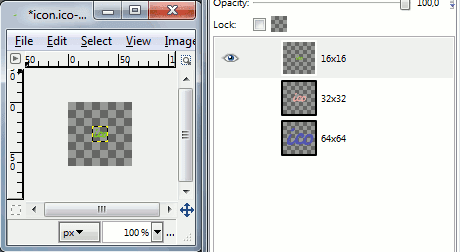
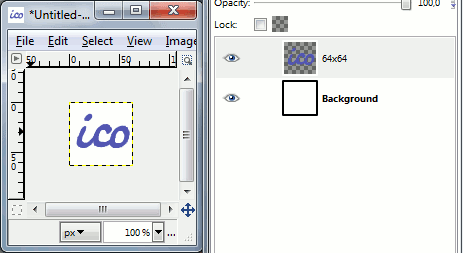
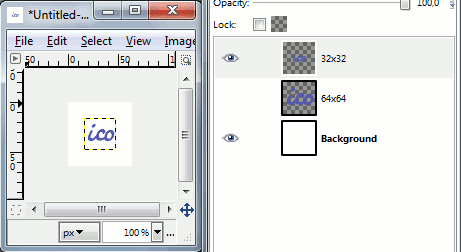
First of all create image with biggest size you need. I chose 64x64. You might also want to create a layer with background to see the result better. I usually use white or dark-blue depending on foreground image lightness.

Then duplicate the layer with icon and select "Scale Layer.." from layer's right-click menu. Resize it to next size you need, ex. 32x32. Note, that unlike in Photoshop you can have layers with different size. By default you'll see current layer's border.

Let's create the last layer 16x16 and colorize layers with different colors. Also delete background before saving icon (leave only layers with icon images).

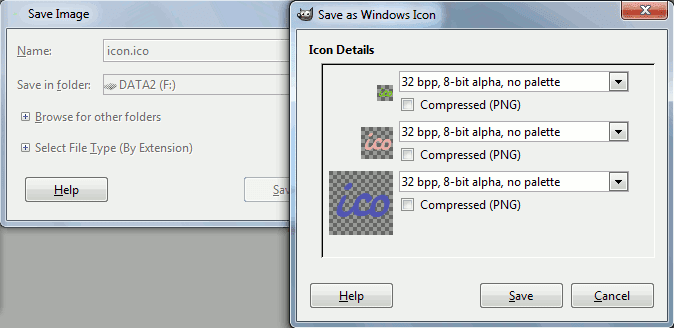
Now save document as .ico file.

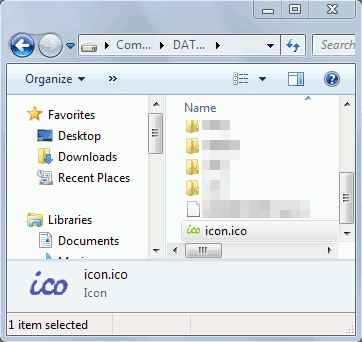
Now you have icon with all the images. On the following screenshot explorer shows different images in file list window (16x16 icon) and preview window (smaller sized 64x64 icon).

Saturday, February 5, 2011

HtmlAgilityPack and XPath Peculiarity

Parsing several HTML pages I noticed that HtmlAgilityPack doesn't consider that its node has relative path for XPath. The following code illustrates this:

var html = @"
<div class="
"header"">
    <p>header <span>paragraph 1-1</span></p>
    <p>header <span>paragraph 1-2</span></p>
</div>
<div class="
"content"">
    <p>content <span>paragraph 2-1</span></p>
    <p>content <span>paragraph 2-2</span></p>
<div>
    "
;

var doc = new HtmlDocument();
doc.LoadHtml(html);

var node = doc.DocumentNode.SelectSingleNode("div[1]/p[1]");

Console.WriteLine("\r\n1st <p> in 1st <div>:");
Console.WriteLine(node.OuterHtml);

Console.WriteLine("\r\nCount of <span> (//):");
Console.WriteLine(node.SelectNodes("//span").Count);

Console.WriteLine("\r\nCount of <span> (.//):");
Console.WriteLine(node.SelectNodes(".//span").Count);

It produces the output:

1st <p> in 1st <div>:
<p>header <span>paragraph 1-1</span></p>

Count of <span> (//):
4

Count of <span> (.//):
1

w3schools.com says that "//" selects nodes "from the current node". So does it mean that HtmlAgilityPack works wrong?

Learning XPath on w3schools.com I had no doubt. But W3C specification says that it's alright:

//para selects all the para descendants of the document root and thus selects all para elements in the same document as the context node
.//para selects the para element descendants of the context node

All I wanna say is that you must be cautious to the information you got, even if it from the popular site with a good reputation (like w3schools is). "Trust no one", like Horde says :).

Wednesday, January 26, 2011

LINQ to SQL and Memory Leaks

This happened when I parsed several gigabytes of HTML pages. I've noticed that program's process ate my memory tragically - over 1 GB in 5-10 minutes.

The first thing I thought was memory leaks in HtmlAgilityPack, that I heard being updated not very often. But removing it was not successful. After several minutes of removing all components I figured out that the reason is LINQ to SQL. My code like the following:

var dcTableOne = new TableOneDataContext(_connectionString);
while (true)
{
    var row = new TableOne() { Status = 0, Name = stringToSave };
    dc.TableOnes.InsertOnSubmit(row);
    dc.SubmitChanges();
}

Besides of that I had notice that Entity Framework v4 has memory leaks too. The only method that woks fine was direct SQL executing - via SqlCommand.ExecuteNonQuery or via the same but over LINQ to SQL:

dcTableOne.ExecuteCommand("INSERT INTO TableOne(Status,Name) VALUES({0},{1})", 0, stringToSave);

After minutes of googling the reason was found. LINQ to SQL (and EF) has the feature, that tracks all objects that passed through it. And what I needed to do is turn it off. But it's caused my code to fail on inserts. So, I wend in further searches. They said me that DataContext object was designed for short lifetime and then has to be used in such way:

while (true)
{
    using (var dc = new TableOneDataContext(_connectionString))
    {
        var row = new TableOne() { Status = 0, Name = stringToSave };
        dc.TableOnes.InsertOnSubmit(row);
        dc.SubmitChanges();
    }
}

That fixed my problems, but after a moment of working on my project I got similar problem: I required to read big array of data from database, and it couldn't be solved with the method mentioned above by the technical reason - I had to read all data sequentially. Turning tracking off was the right decision:

dcTableOne.ObjectTrackingEnabled = false;
foreach (var elem in dcTableOne.TableOnes)
{
    // working with elem
}

Thursday, December 23, 2010

C# and Static Linking

When I was writing application that required to parse HTML pages, I selected HtmlAgilityPack to do this. It is excellent library but it's sometimes inconvenient to distribute program with multiple DLLs. So, I decided to link required DLL statically.

The first solving that I found was to merge required assemblies into my own using ILMerge. Spent a little time to find required options I merged DLL into the program:

ILMerge.exe /targetplatform:v4,"C:\Windows\Microsoft.NET\Framework4.0.30319" /out:appout.exe app.exe HtmlAgilityPack.dll

It works ok, but while searching command line options I found another decision by Jeffrey Richter how to get one file for application. Read the comments I took a notice on this one by Jeff:

ILMerge produces a new assembly file from a set of existing assemblies. This means that the original assemblies lose their identity (name, version, culture, and public key).
What I am showing here is creating an assembly that embeds the EXISTING assemblies into it so that they do not lose their identity at all.

So, I decided to use his method. But there was one problem - it didn't work for me :). His code couldn't find the resource. So, I started to search further for its another variations. But I couldn't find what's was wrong.

Nevertheless, I found two ways how to implement Jeff's idea. The first resolution is direct:

AppDomain.CurrentDomain.AssemblyResolve += (sender, args) =>
{
    if (new AssemblyName(args.Name).Name == "HtmlAgilityPack")
        return Assembly.Load(Properties.Resources.HtmlAgilityPack);
    return null;
}

And the second is more universal and doesn't require to write "if" for every embedded assembly:

AppDomain.CurrentDomain.AssemblyResolve += (sender, args) =>
{
    var requestedAssemblyName = new AssemblyName(args.Name).Name;
    var manifestResourceName = new AssemblyName(Assembly.GetExecutingAssembly().FullName).Name + ".Properties.Resources.resources";
    using (var stream = Assembly.GetExecutingAssembly().GetManifestResourceStream(manifestResourceName))
    {
        using (var reader = new ResourceReader(stream))
        {
            var resource = reader.GetEnumerator();
            while (resource.MoveNext())
            {
                if ((string)resource.Key == requestedAssemblyName)
                    return Assembly.Load((byte[])resource.Value);
            }
        }
    }
    return null;
}

Friday, November 19, 2010

GetColor Color Picker

I'm not a designer, and marking-up HTML is not my primary duty too, but sometimes I have requirement to choose some colors. I've tried several color pickers, but they turned out to be not very convenient. The problem was that I had to press "Copy" button.

Therefore, I decided to write my own. And here it is.

It hasn't great functions like some other pickers, but it might being liked to you of its "Your selected color is already in the clipboard" function. It's really handy, try it right now! :)

Hold ALT key and move your mouse to view zoomed region. You can change zoom factor and click on the preview window to select the color.

Download GetColor v0.7 (10 KB)

Download GetColor v0.7 Sources (12 KB)

Thursday, October 14, 2010

foobar2000 Plugin for Windows 7 - Progress Bar on Its Taskbar Icon

Some tautology but it's true :).
Shows progress of currently played song in the taskbar. Foobar is stopped:

Foobar is playing song:

Foobar is paused:

Minimal OS is Windows 7, of cause.

NOTE! This plugin is for version 0.8.3, not 0.9 or 1.0, 'cos I like it. It's sad, but new versions (since 0.9) don't satisfy my requirements (the main is customization of playlist with my own colors, not default one with several tones).

Download "foo_win7_taskbar_progress" plugin (3 KB)

Download Sources for "foo_win7_taskbar_progress" plugin (927 KB)